FFmpeg MCP Server: Let Claude Edit Video from Chat
An FFmpeg MCP server gives Claude (or any MCP client) a set of video tools it can call from chat: trim, add a title, join clips, export a GIF. Instead of asking the model to write an ffmpeg command and hoping it is right, the server runs a tested command and reports back what it wrote. We picked the most-used FFmpeg MCP servers on GitHub, installed two of them on a Windows 11 PC, and called their tools on a test clip without Claude in the loop, so you can see the raw requests and replies.
- ffmpeg-skill (MIT) and Kinocut (Apache-2.0, formerly mcp-video) both trimmed, titled and joined our clip correctly over MCP.
- Their tool lists are big: ffmpeg-skill’s default 12 tools came to about 18,400 tokens of definitions, Kinocut’s 18 tools about 5,600.
- Both refuse to overwrite files by default. Only ffmpeg-skill can be locked to one folder; Kinocut wrote outside our test folder when asked.
The FFmpeg MCP servers worth knowing
We searched GitHub for FFmpeg and video-editing MCP servers and kept the ones that run FFmpeg locally and are still maintained. Figures were checked on November 28, 2026:
| Repository | Stars | License | Last commit | Tools over MCP |
|---|---|---|---|---|
| kajisho5/ffmpeg-skill | 12,175 | MIT | Nov 28, 2026 (v4.26.1) | 12 listed, 41 in total |
| KyaniteLabs/kinocut | 289 | Apache-2.0 | Nov 25, 2026 (v2.2.0) | 18 listed, 208 in total |
| video-creator/ffmpeg-mcp | 156 | MIT | May 20, 2026 | 8 (per README) |
tools/list returned on our machine. We did not install the third.ffmpeg-skill is primarily an Agent Skill for Claude Code, Cursor and Codex, but every one of its scripts is also exposed as an MCP tool. Kinocut was called mcp-video until July 2026; the old package name still installs it. video-creator/ffmpeg-mcp is a small, older server (find, clip, concat, overlay, scale, extract frames) whose last commit was a security fix in May. Some well-known names did not make the list: burningion/video-editing-mcp (296 stars) drives the hosted Video Jungle service rather than local FFmpeg, and has not been updated since October 2025.
If you want the wider picture of AI video tools, including Remotion and Auto-Editor, see our list of GitHub repos for AI video editing.
How we tested without Claude
We used the official MCP Inspector CLI (v2.17.0), which starts a server over stdio, sends one request and prints the JSON reply. That shows exactly what Claude would see. The machine had Node 26, Python 3.12, uv 0.13 and FFmpeg 9.0.2. All work happened in one scratch folder with a generated 10-second clip: FFmpeg’s testsrc pattern (it shows a running counter, which makes cuts easy to check) plus a 440 Hz tone, and a 4-second color-bar clip to join onto it.
ffmpeg -f lavfi -i testsrc=size=1280x720:rate=30:duration=10 ^
  -f lavfi -i sine=frequency=440:duration=10 ^
  -c:v libx264 -pix_fmt yuv420p -c:a aac -shortest clip.mp4
Test 1: ffmpeg-skill
The npm package starts the MCP server directly. Listing its tools took 33.6 seconds the first time, most of that being npx downloading the package:
npx @modelcontextprotocol/inspector --cli npx -y ffmpeg-skill@4.26.1 mcp --method tools/listIt returned 12 tools: audio, caption, check, cut, export, fit, graphics, look, loudness, probe, render and silence. The schemas are detailed (the cut tool alone has 41 parameters), so the definitions added up to 73,543 characters. Using the rough rule of four characters per token, that is about 18,400 tokens before you have edited anything. Setting FFMPEG_SKILL_MCP_FULL=1 lists all 41 tools at about 46,600 tokens.
The first snag. The README says unlisted tools stay callable by name. The Inspector disagreed: our first overlay and join calls failed with Tool 'overlay' not found on server, because the client only calls tools it has seen in the list. Claude works the same way, so if you need text overlays or joins, add them to the list with the FFMPEG_SKILL_MCP_TOOLS setting (or use the full list). We reran with the full list.
Trim. We asked cut for seconds 2 to 6:
--method tools/call --tool-name cut --tool-arg input=...workclip.mp4
  --tool-arg output=...workfs-trim.mp4 --tool-arg start=2 --tool-arg end=6

"status": "completed",
"wrote": "4.167 s (ASKED 4.000 s: 0.167 s longer), 1280x720, 30.0 fps, picture and sound",
"verified": true,
"lossless": true
It used a stream copy (no re-encode), so the cut snapped to a keyframe and came out 0.167 seconds long, and it said so instead of hiding it. The reply also includes the exact ffmpeg command it ran and a full probe of the output. That honesty costs space: this one reply was 11,886 characters, roughly 3,000 tokens.
Add text. overlay with text="Edited by an MCP tool call", position=bottom, box=true completed and returned a 4.067 s file. It also reported a fallback: the default font, DejaVu Sans, was not installed, so it drew with Arial. Our first try used position=bottom-center and was rejected with the list of valid names, which is the kind of error a model can recover from.
Join and GIF. join with a 0.5 s fade produced a 7.567 s clip (4.067 + 4.0 − 0.5), and export with the gif preset turned that into a 480×270, 12 fps looping GIF of 344,865 bytes, using a generated palette. Each call took 7 to 20 seconds of wall time, mostly npx and Python start-up, because the Inspector launches a fresh server per call. In Claude the server stays running.
Before: 10.0 s test clip
After: 7.6 s, three tool calls
Test 2: Kinocut
Kinocut is a Python package run through uvx. The first tools/list took 54 seconds while uv installed 35 packages; after that, each Inspector call (start the server, call one tool, exit) took 5 to 20 seconds.
npx @modelcontextprotocol/inspector --cli uvx --from kinocut==2.2.0 kino --mcp --method tools/listIt lists 18 tools: eight everyday ones (video_info, video_trim, video_merge, video_add_text, video_add_audio, video_extract_frame, video_shorts, video_doctor), eight “family” tools that take an operation name, plus list_operations and describe_operation. The definitions came to 22,344 characters, about 5,600 tokens. Everything else (208 tools with KINOCUT_TOOLS=all) is reached through the family tools, so nothing is hidden from the client the way ffmpeg-skill’s extra tools were.
We ran the same edit plus an audio extraction:
| Call | Result | Server-reported time |
|---|---|---|
video_trim start=2, end=6 | 4.0 s, 1280×720, 0.13 MB | 708 ms |
video_add_text bottom-center, size 56 | 4.0 s, 0.14 MB | 658 ms |
video_merge fade 0.5 s with color bars | 7.5 s, 0.26 MB | 1,226 ms |
video_edit_ops → video_extract_audio | 7.5 s MP3, 181,958 bytes | not reported |
Kinocut re-encodes trims, so its cut was exactly 4.0 seconds. Its replies are short, about 500 to 900 characters, against several thousand for ffmpeg-skill, but they also say less: no command line and no verification steps. One call failed on our side. We passed review=false to video_add_text, which does not accept that option, and got a clear invalid_parameter error listing the accepted arguments.
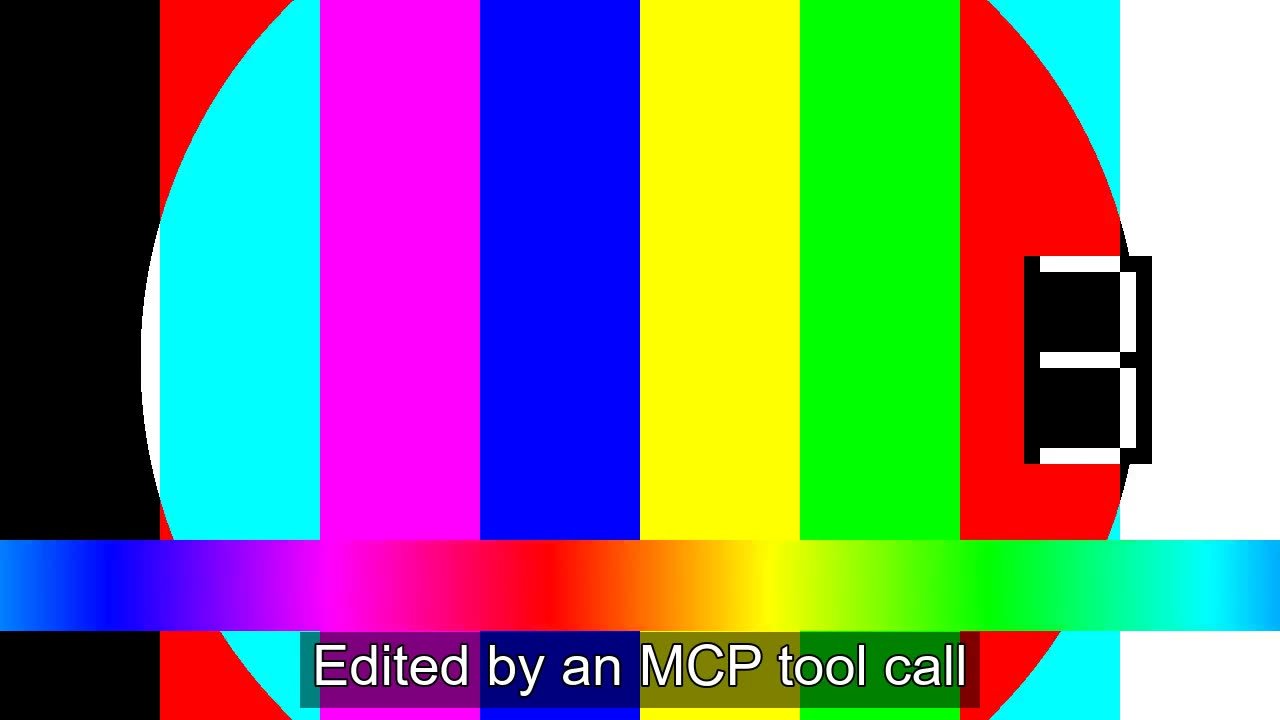
ffmpeg-skill overlay
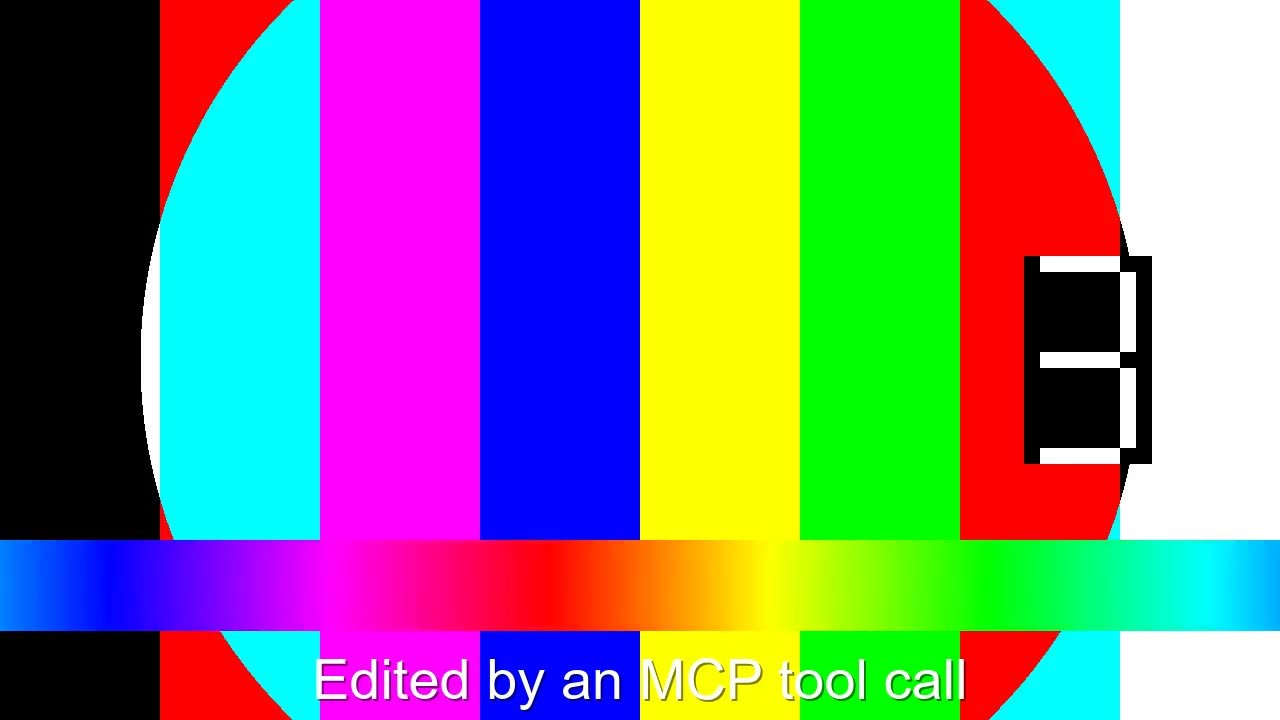
Kinocut video_add_text
Add an FFmpeg MCP server to Claude
Kinocut, from its README. Claude Code:
claude mcp add kinocut -- uvx --from kinocut==2.2.0 kino --mcpClaude Desktop (claude_desktop_config.json):
{
  "mcpServers": {
    "kinocut": {
      "command": "uvx",
      "args": ["--from", "kinocut==2.2.0", "kino", "--mcp"]
    }
  }
}ffmpeg-skill. For Claude Code the README recommends installing it as a skill (npx ffmpeg-skill) or as a plugin, not as an MCP server. For MCP clients it documents npx -y ffmpeg-skill mcp and this Claude Desktop entry, which points at the installed copy:
{"mcpServers": {"ffmpeg-skill": {"command": "python3", "args": ["/Users/you/.claude/skills/ffmpeg-skill/mcp/server.py"],
  "env": {"FFMPEG_SKILL_ROOTS": "/Users/you/Videos"}}}}
On Windows with Python from python.org, change python3 to python, as the README notes. The README has no claude mcp add line; if you want the MCP route in Claude Code anyway, wrapping the documented command in Claude Code’s standard syntax looks like claude mcp add ffmpeg-skill -e FFMPEG_SKILL_ROOTS=D:Videos -- npx -y ffmpeg-skill mcp. That line is ours, not the project’s.
Safety: sandbox the working folder
An MCP server that runs FFmpeg reads and writes files with your user account’s permissions. A model that gets a path wrong, or follows instructions hidden in a file name or subtitle, can overwrite footage. We tested what each server does about that:
| Test | ffmpeg-skill | Kinocut |
|---|---|---|
| Write to a file that already exists | Refused: output_exists | Refused: output_exists |
| Write outside the test folder | Refused: path_outside_roots (with FFMPEG_SKILL_ROOTS set) | Wrote the file |
| Runs a shell | No, per its SECURITY.md: only its scripts, ffmpeg and ffprobe | Not tested |
Both servers need an explicit overwrite flag to replace a file, and the existing file was untouched in both tests. Only ffmpeg-skill could be locked to a folder. We did not find a documented setting that does the same in Kinocut, and its video_merge description says “an existing supplied path may be overwritten” (it refused in our test without the flag). Practical rules:
- Give the server its own folder of copies, never your only originals.
- With ffmpeg-skill, always set
FFMPEG_SKILL_ROOTSto that folder. - Keep Claude’s approval prompt on for tools marked destructive. Both servers mark their writing tools with
destructiveHint: true. - Pin versions (
ffmpeg-skill@4.26.1,kinocut==2.2.0) rather than pulling the latest on every start.
Which one to use
Pick ffmpeg-skill if you want the edit checked: lossless cuts where possible, a verification report with every result, and folder locking. Accept the context cost, or trim the tool list with FFMPEG_SKILL_MCP_TOOLS. In Claude Code, its own recommendation, the skill install, avoids loading MCP schemas at all.
Pick Kinocut if you want a lighter tool list, short replies and a huge catalog of extra operations behind it. Run it in a dedicated folder, since it will write wherever it is told. To compare tools like these on your own tasks, our prompts for evaluating AI tools are a good starting set.
FAQ
Can Claude edit video with FFmpeg?
Yes. With an FFmpeg MCP server connected, Claude calls tools such as trim, add text and join, and the server runs FFmpeg on your machine. Claude never touches the pixels itself; it chooses the tools and their settings.
Do I need FFmpeg installed?
Yes, both servers call your local ffmpeg and ffprobe. ffmpeg-skill’s npx ffmpeg-skill setup can install it with winget, Homebrew or apt. ffmpeg-skill also needs Python 3.10 or newer, and Kinocut needs uv (or pip).
Why are the tool definitions so large?
Every parameter of every tool is described so the model can use it without guessing. Claude reads those definitions on each turn, so a server with 18,000 tokens of schemas uses part of your context window before you start. Both projects default to a short list for this reason.
Is it safe to let an AI edit my videos?
Safe enough if you work on copies in a sandbox folder and keep approval prompts on. Neither server overwrote an existing file in our tests, but only ffmpeg-skill stopped a write outside the folder.
Tested by Mediaxiss on Windows 11 with FFmpeg 9.0.2, Node 26, Python 3.12, MCP Inspector 2.17.0, ffmpeg-skill 4.26.1 and Kinocut 2.2.0, November 28, 2026. Stars, licenses and last commits were checked on GitHub the same day. Token figures are estimates (characters divided by four). Setup snippets are quoted from each project’s README; always follow the current official instructions.