10 GitHub Repos for AI Video Editing and Generation
Open-source video tools have caught up fast. You can now ask Claude to cut your talking-head footage, drive DaVinci Resolve from a chat window, render motion graphics from code, or generate clips with open video models on your own GPU. We went through dozens of GitHub repos for AI video editing and generation and picked the ten that are actively maintained, clearly licensed and genuinely useful. Every star count, license and release date below was checked on GitHub on November 28, 2026.
- Six of the ten work with Claude: through a Claude Code plugin or skill, an MCP server, or an Anthropic API key.
- Editing tools (HyperFrames, video-use, Remotion, Auto-Editor, Shotcut) run on a normal laptop. Generation models (Wan 2.2, LTX-2) need a serious GPU.
- “Open source” varies: Remotion and the LTX-2 model weights have commercial limits for larger companies. Check the license before you build a business on any of them.
Quick comparison
| Repo | What it does | Works with Claude | GPU needed | License | Stars |
|---|---|---|---|---|---|
| HyperFrames | HTML to MP4 motion graphics | Yes (plugin, skills) | No | Apache-2.0 | ~91.7k |
| video-use | Edits raw footage from a chat | Yes (Claude Code skill) | No | MIT | ~31.7k |
| DaVinci Resolve MCP | Controls Resolve from Claude | Yes (MCP server) | No | MIT | ~4.5k |
| Remotion | Videos written in React | Yes (official skills) | No | Remotion License | ~76.2k |
| MoneyPrinterTurbo | Topic to finished short | Yes (API key or Claude CLI) | Optional | MIT | ~146.1k |
| ComfyUI | Runs open video models | Via MCP | Yes | GPL-3.0 | ~149.0k |
| Wan 2.2 | Text and image to video | No | Yes, 24 GB+ | Apache-2.0 | ~19.0k |
| LTX-2 | Video with synced audio | No | Yes | Apache-2.0 code, own weights license | ~10.4k |
| Shotcut | Timeline video editor | No | No | GPL-3.0 | ~15.8k |
| Auto-Editor | Cuts silence automatically | Via agent skills | No | Unlicense | ~6.2k |
How we picked these repos
We started from GitHub topics, community recommendations and the questions people actually search for, then checked each candidate with the GitHub API and read its README. A repo made the list only if it had a push in the last twelve months, a clear license and documentation good enough to get started. We dropped well-known names that have gone quiet, including Olive, Editly, SadTalker and Wav2Lip. We installed and ran three of them ourselves (HyperFrames, Remotion and Auto-Editor) on a Windows 11 laptop with a 4 GB GTX 1650, and the videos below are their real, unedited output. For the other seven we embed each project’s own official demo video where one exists; their setup notes summarize the project’s documentation.
1. HyperFrames: motion graphics from HTML, built for agents
heygen-com/hyperframes is HeyGen’s open-source video framework. You, or Claude, write a composition in plain HTML, CSS and JavaScript, and it renders a frame-exact MP4 using headless Chrome and FFmpeg. It needs Node.js 22+ and FFmpeg, no GPU. Think explainers, launch videos, captions and lower thirds that stay editable as code, an open-source alternative to template-heavy After Effects work.
With Claude: the README offers a Claude Code plugin, agent skills you can add with one command, and a beta connector for Claude chat.
claude plugin marketplace add heygen-com/hyperframes
claude plugin install hyperframes@hyperframes
Watch out: the framework is Apache-2.0, but the desktop Studio’s built-in agent and HeyGen’s premium generative models sit on a paid plan.
We tested it: we wrote a 40-line HTML composition (a code card, an arrow and an animated result card, timed with GSAP) and ran npx hyperframes render --quality=draft with HyperFrames v0.9.104. It rendered a 6-second 1080p MP4 in 20.3 seconds, with no GPU setup. This is that file:

2. video-use: let Claude edit your raw footage
browser-use/video-use is a Claude Code skill that turns a folder of raw takes into a finished video. It removes filler words and dead air, color grades, adds subtitles and generates overlays. The clever part: the model never watches the video. It reads a word-level transcript and looks at filmstrip and waveform images only when it needs to, then checks its own render before showing you. It is the closest open-source answer to Descript-style talking-head cleanup.
git clone https://github.com/browser-use/video-use ~/Developer/video-use
ln -sfn ~/Developer/video-use ~/.claude/skills/video-use
cd ~/Developer/video-use && uv sync
Watch out: transcription uses ElevenLabs, a paid API, so it is not fully free or local. The install steps assume macOS or Linux.
See it run: the project has no official YouTube video, but the browser-use team links a 15-second demo on TikTok from the README.
3. DaVinci Resolve MCP: drive Resolve from Claude
samuelgursky/davinci-resolve-mcp is an MCP server that lets Claude control DaVinci Resolve through Blackmagic’s official scripting API: organize bins, build timelines, set up renders, add review markers and run silence or beat analysis. Its installer detects Resolve and can configure Claude Desktop and Claude Code for you.
npx davinci-resolve-mcp setupWatch out: it is really meant for the paid Resolve Studio. The README notes that Resolve 21.1 moved Python scripting to Studio, so the free-edition workaround only works up to 21.0.x. In Resolve, set Preferences, General, “External scripting using” to Local before connecting.
4. Remotion: make videos with React and Claude Code
remotion-dev/remotion treats every video as a React project you preview in Remotion Studio and render locally or in the cloud. It shines for data-driven and templated videos and for rendering thousands of personalized variants. The official Remotion skills teach Claude Code how to create, caption and render compositions.
npx create-video@latest --skillsWatch out: Remotion is source-available, not OSI open source. It is free for individuals, non-profits and companies with up to three employees; larger companies need a paid license.
We tested it: a minimal React composition (an animated headline, a progress bar and eight repo chips that spring in) rendered with npx remotion render on Remotion 4.0.547. The 6-second, 1280×720 clip took 57 seconds on the first run. Every frame comes from React state, so changing the list or the colours is a code edit, not a re-edit. We built the same scene in both tools for Remotion vs HyperFrames, with render times side by side.

5. MoneyPrinterTurbo: topic in, short video out
harry0703/MoneyPrinterTurbo takes a topic or keyword and produces a finished vertical or horizontal short: it writes the script with an LLM, adds a voiceover, pulls stock footage, and adds subtitles and music. It supports Anthropic Claude through an API key, and can even use a logged-in Claude Code subscription through the claude command-line tool. A GPU is optional.
python -m venv .venv
.venvScriptsActivate.ps1      # macOS/Linux: source .venv/bin/activate
python -m pip install mpt
mpt webui
Watch out: results are template-style stock-footage videos, and you need your own Pexels API key for footage. The README warns that some bundled background music comes from YouTube videos, so replace it with licensed music before you publish.
See sample output: the README links finished example videos made by the tool, such as “The Future of Everyday Robotics”.
6. ComfyUI: run open video models locally
Comfy-Org/ComfyUI is the standard app for running open image and video models on your own machine. You build workflows as node graphs and save them as files. Its README lists support for Wan 2.1 and 2.2, LTX-Video 2, HunyuanVideo 1.5, CogVideoX and more, and claims it can run large models on as little as 4 GB of VRAM with 8 GB of RAM (slowly). It also documents “Comfy MCP”, so MCP clients such as Claude Desktop can drive it.
pip install comfy-cli
comfy install
Watch out: custom nodes are the most common cause of breakage. If something fails, the README suggests starting with custom nodes disabled.

7. Wan 2.2: an Apache-licensed open video model
Wan-Video/Wan2.2 is Alibaba’s open model family for text-to-video, image-to-video, speech-to-video and character animation. Its permissive Apache-2.0 license makes it one of the safest open models for commercial work, and it is built into ComfyUI and Diffusers.
Watch out: hardware. The README says the 5B model needs a GPU with at least 24 GB of VRAM (such as an RTX 4090), and the 14B models need 80 GB on a single GPU. Most people run it through ComfyUI with memory-saving add-ons.

8. LTX-2: video and audio from one model
Lightricks/LTX-2 generates video with synchronized sound from text or images, and adds pro features such as regenerating a time range, HDR output, up to 4K rendering and lip-matched dubbing. The recommended model download is roughly 66 GiB.
Watch out: the code is Apache-2.0 but the model weights have their own license, which requires a paid commercial license for companies with annual revenue of $10 million or more. The model files on Hugging Face are gated behind accepting the terms.

9. Shotcut: a free Premiere Pro and CapCut alternative
mltframework/shotcut is a traditional timeline editor for Windows, macOS and Linux, and the place to finish AI-generated clips without a subscription. Recent releases include built-in speech-to-text through whisper.cpp and a subtitle burn-in filter. Download installers from shotcut.org.
Watch out: the latest release notes are mostly fixes for regressions from the previous version, so avoid upgrading in the middle of a project.

10. Auto-Editor: cut silence in one command
WyattBlue/auto-editor removes silent or motionless stretches from video and audio automatically, and can export the cut as a timeline for Premiere, Resolve, Final Cut, Shotcut or Kdenlive. It is public domain and ships agent skills that coding agents, including Claude Code, can load.
auto-editor my-recording.mp4 --margin 0.2s --export resolveWatch out: it cuts on loudness and motion only. It does not understand what was said, so it will not remove filler words or bad takes the way video-use does.
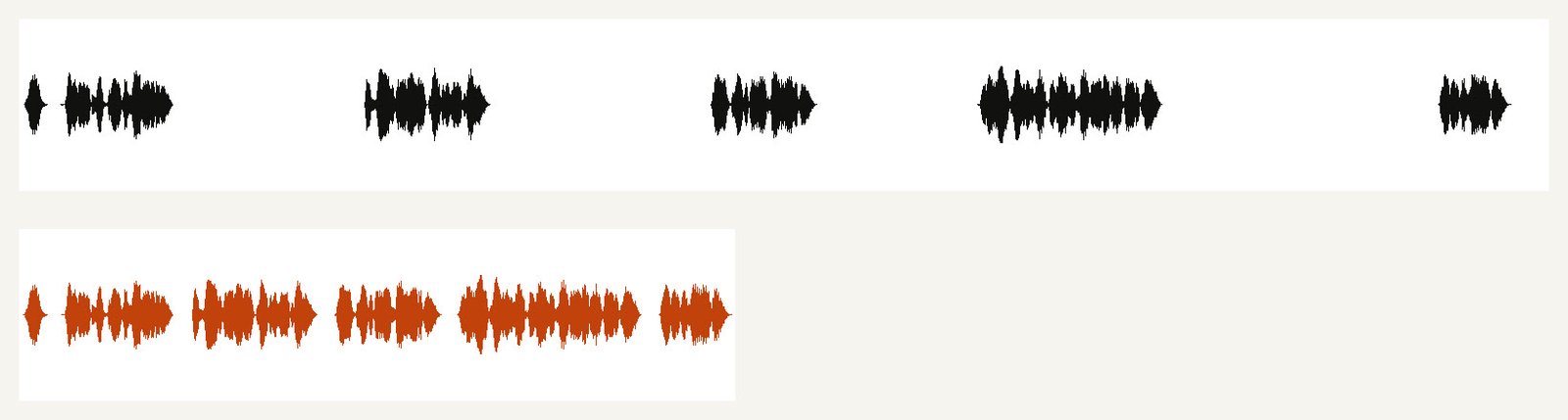
We tested it: we recorded a 26.7-second voice clip with five long pauses, turned it into a video and ran auto-editor original.mp4 (version 29.3.1, default settings). It finished in 1.96 seconds and produced a 12.5-second video: every pause gone, every sentence intact. For the next step, captions, see our test of WhisperX vs Faster-Whisper for subtitles. Press play on both to hear the difference.
Before: 26.7 s
After: 12.5 s
Can Claude edit videos?
Not by itself: Claude cannot open a video file and scrub through it. But it can edit video very effectively through tools, in three ways (we tested one of them in FFmpeg MCP server with Claude):
- Skills and plugins in Claude Code (video-use, HyperFrames, Remotion, Auto-Editor): Claude writes and runs the commands that edit or render your video, from a folder on your machine.
- MCP servers (DaVinci Resolve MCP, Comfy MCP): Claude Desktop or Claude Code controls an app you already use.
- An API key inside a pipeline (MoneyPrinterTurbo): Claude writes scripts and plans while the tool does the rendering.
Open-source alternatives to paid video software
| Paid tool | Open-source option from this list | How close it gets |
|---|---|---|
| Premiere Pro, CapCut (desktop) | Shotcut | Full timeline editing; fewer AI features |
| After Effects | HyperFrames, Remotion | Motion graphics as code; no keyframe UI like After Effects |
| Descript | video-use, Auto-Editor | Transcript-driven and silence cuts; no polished editor app |
| Runway, Pika | Wan 2.2, LTX-2 in ComfyUI | Strong results with a big GPU and some setup |
| Faceless-video generators | MoneyPrinterTurbo | Template shorts from stock footage |
| Synthesia, HeyGen avatars | None on this list | We found no maintained, clearly licensed open-source match yet |
What runs on a normal laptop
Everything in the editing group (HyperFrames, video-use, DaVinci Resolve MCP, Remotion, Shotcut and Auto-Editor) runs without a dedicated GPU, although Resolve itself benefits from one. MoneyPrinterTurbo runs on 4 CPU cores and 4 GB of RAM, with a GPU only speeding up transcription. The generation models are different: Wan 2.2 wants at least a 24 GB card for its smallest model, and LTX-2 needs a CUDA GPU plus about 66 GiB of model files. Without that hardware, use them through a cloud GPU.
FAQ
Can Claude edit videos in DaVinci Resolve?
Yes, through the DaVinci Resolve MCP server. It works best with Resolve Studio; the free edition’s workaround stopped working in Resolve 21.1.
What is the best open-source AI video generator to run locally?
For most people, Wan 2.2 inside ComfyUI, because of its Apache-2.0 license and wide support. If you want sound generated with the picture, try LTX-2, and check its weights license if your company is large.
Is there an open-source HeyGen or Synthesia alternative?
Not one we would recommend today. The best-known talking-head repos are either unmaintained or have unclear licenses. HeyGen’s own open-source project, HyperFrames, is a motion-graphics framework rather than an avatar generator.
Are these tools free for commercial use?
Most are: MIT, Apache-2.0, GPL-3.0 and the Unlicense all allow commercial use. The exceptions are Remotion, which needs a paid license for companies with more than three employees, and the LTX-2 model weights, which need one above $10 million in annual revenue. Some tools also call paid services, such as ElevenLabs in video-use.
Repository data (stars, licenses, last activity and releases) checked on GitHub on November 28, 2026. Setup steps are summarized from each project’s README; always follow the current official instructions.